
Video Brochure File Requirements: Video Format, Resolution & Artwork Guide
Prepare your video files and artwork correctly before custom video brochure production.
When preparing a custom video brochure project, customers usually need to provide two types of files:
- Video files — the content that will be played on the LCD screen
- Artwork files — the design files used for printing and production
Preparing the correct files before production helps avoid delays and ensures the final video brochure delivers the expected viewing and printing quality.
CheerTrend supports customers with file checking, video preparation, artwork review, and production setup before manufacturing.
Video File Requirements for Video Brochures
A video brochure can support different video file formats depending on the LCD module and playback system used in your project. Common formats are supported, including:
- MP4
- AVI
- MOV
- Other standard video formats
For the best compatibility and playback performance, we recommend:
| Item | Recommended Requirement |
|---|---|
| Video Format | MP4 |
| Video Codec | H.264 |
| Audio Format | MP3 |
| Frame Rate | 25–30 fps |
| Aspect Ratio | Match the LCD screen |
| File Name | Use simple English names |
MP4 with H.264 compression is recommended because it provides good compatibility, efficient file size, and smooth playback on most video brochure modules.
Manufacturer insight: During production, we receive video files from many different sources, including marketing agencies, design teams, and end customers. Files created from different editing software may use different codecs or export settings, so we normally check video compatibility before loading content into the finished video brochure.
Common Video Resolution Options for Different Screen Sizes
Choosing a suitable video resolution helps your content display clearly without unnecessary file size.
| Video Brochure Screen Size | Common Baseline Resolution |
|---|---|
| 2.4 inch | 320 × 240 |
| 4.3 inch | 480 × 272 |
| 5 inch | 800 × 480 |
| 7 inch | 1024 × 600 |
| 10.1 inch | 1024 × 600 |
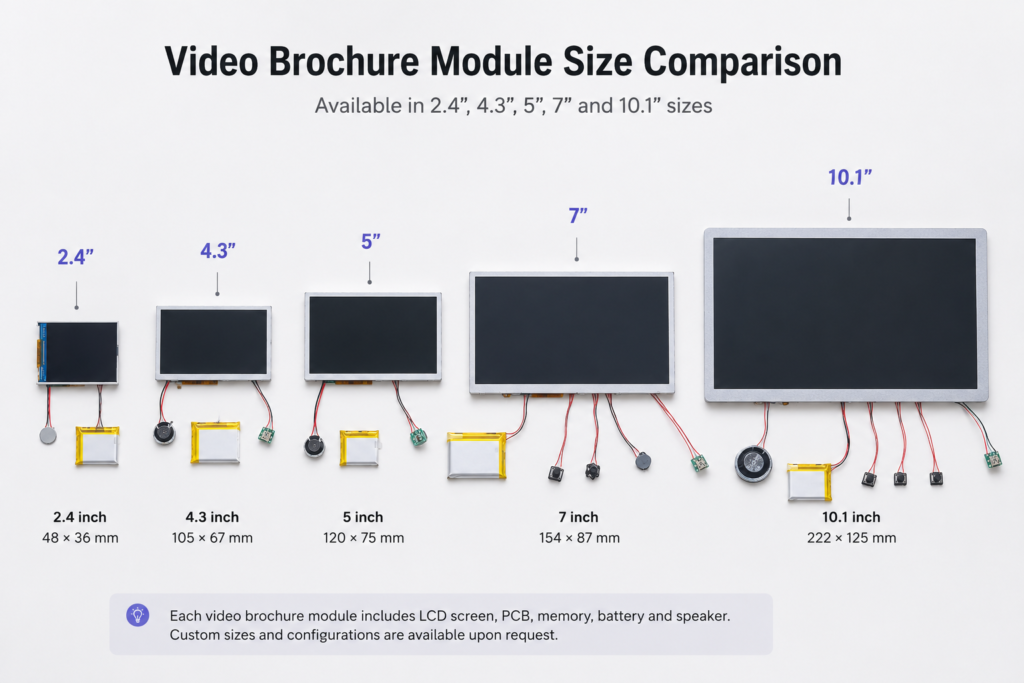
These are common baseline resolutions. Higher resolution options are also available depending on the LCD module selected for your project. The final supported resolution depends on the specific LCD module selected for your video brochure project.
If the video resolution is too low, images may appear blurry. If the resolution is much higher than the screen capability, the file size may increase without improving the viewing experience.
Video File Size and Memory Requirements
The maximum video length depends on several factors:
- Video resolution
- Compression settings
- Bitrate
- Number of videos
- Memory capacity
Common memory options include:
| Memory | Typical Use |
|---|---|
| 128MB | Suitable for standard short video content |
| 256MB–512MB | Suitable for longer videos or higher-quality content |
| 1GB+ | Suitable for projects requiring multiple videos or larger files |
For projects with multiple videos or longer presentations, we recommend selecting a larger memory capacity before production.
Battery capacity is also an important consideration because longer playback requirements may require a suitable battery configuration.
Learn more about video brochure battery options and standard configurations in our Video Brochure Battery Capacity Guide.
Artwork File Requirements for Video Brochures
Besides video files, customers also need to prepare artwork files for printing and production.
Recommended artwork formats:
- Adobe Illustrator (.AI)
- PSD
To achieve the best printing quality, please prepare artwork with the following requirements:
✓ CMYK color mode
✓ Correct dieline size
✓ Bleed area included
✓ Fonts converted to outlines
✓ Images at suitable resolution
✓ Screen opening and button positions confirmed
For more details about cover design, printing finishes, and artwork preparation, see our Video Brochure Design Guide.
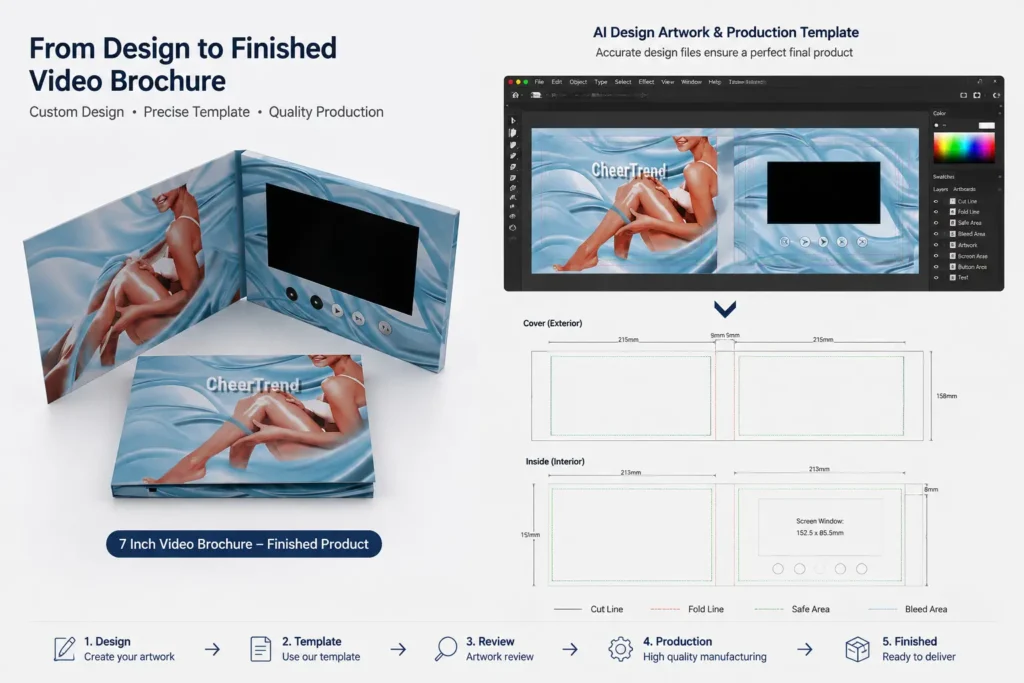
For custom video brochures, the printed cover, LCD screen, buttons, and internal components need to work together. Confirming the structure before final artwork helps prevent production adjustments.
Manufacturer insight: For custom video brochures, artwork is not only a printing file. The screen position, folding structure, buttons, speakers, and internal components all need to be considered before final production. Early artwork review helps avoid changes after printing starts.
Download our Video Brochure Template to prepare your artwork files before production.
Need help preparing your files?
How to Send Video and Artwork Files
Large production files are usually too large for email attachments.
Customers can send files through:
- WeTransfer
- Google Drive
- Dropbox
- Other file-sharing services
The recommended workflow:
Prepare video and artwork files
              ↓
Send files to CheerTrend
              ↓
Production team checks compatibility
              ↓
Confirm final specifications
              ↓
Start manufacturing
              ↓
Test video playback before shipment
Our production team can help review:
- Video format
- Resolution
- File compatibility
- Artwork setup
- Printing requirements
Already received your video brochure? Learn how to upload or update your video after delivery.
Video Brochure Production File Checklist
Before production begins, please confirm:
| Item | Check |
|---|---|
| Video format confirmed | ✓ |
| Video resolution matches screen size | ✓ |
| Audio playback tested | ✓ |
| Artwork size confirmed | ✓ |
| Printing files approved | ✓ |
| Product specifications confirmed | ✓ |
Preparing complete files in advance helps ensure faster sampling and smoother mass production.
Video Brochure File FAQs
MP4, AVI, MOV and other common formats. MP4 with H.264 is recommended.
It depends on screen size and the specific LCD module used. Common baseline resolutions include 480×272 for 4.3 inch, 800×480 for 5 inch, and 1024×600 for 7 and 10.1 inch screens.
AI, PDF, or PSD files prepared in CMYK color mode, with bleed area included and the correct dieline.
Need Help Preparing Your Video Brochure Files?
Whether you already have finished video content or need help preparing artwork, CheerTrend can assist with the complete production process — from file checking and printing to assembly and final testing.
Contact CheerTrend to review your video files, artwork requirements, and custom video brochure specifications.