
Video Brochure Design Guide: Templates, Artwork & Production Tips
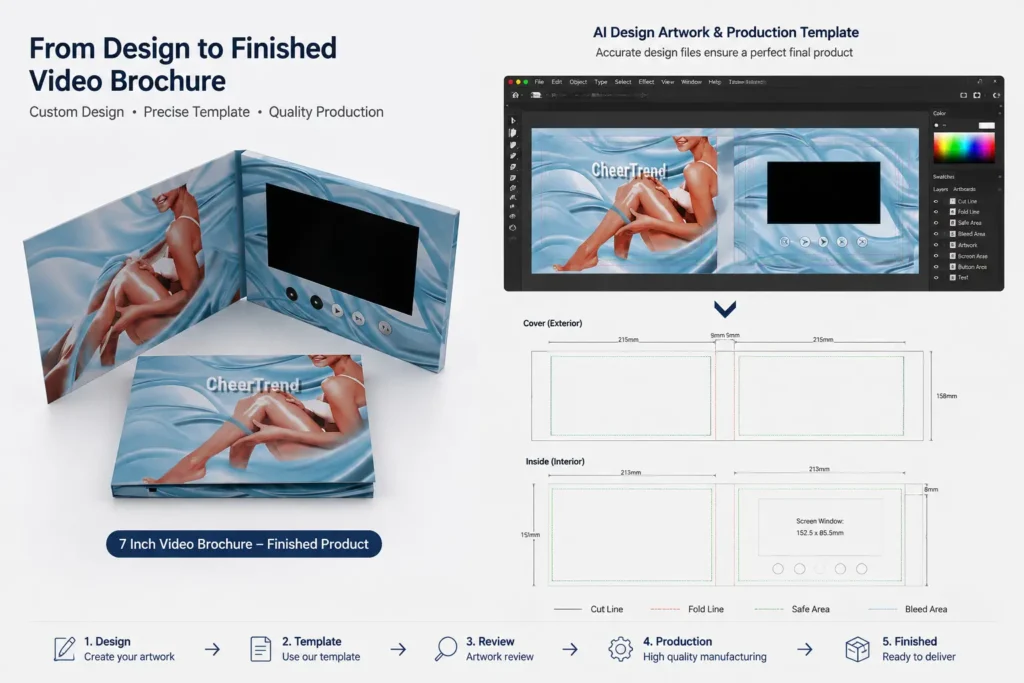
A successful video brochure design requires more than creating an attractive printed cover. Unlike a traditional brochure, a video brochure combines custom printing with an integrated LCD screen, buttons, speakers, battery, and electronic components.
Before production begins, the artwork needs to match the product structure and hardware layout.
This guide explains how to prepare a video brochure design, choose the right template, create production-ready artwork, and avoid common mistakes during manufacturing.
Whether you are creating a corporate presentation, real estate marketing piece, product launch material, or branded promotional item, proper design preparation helps ensure a smooth production process.
Learn more about our custom video brochures and available customization options.
Get a Free Quote + Artwork Template
How to Design a Video Brochure
A video brochure should be designed as a complete experience that combines printed graphics and digital content.
The design process usually includes:
- Selecting the right screen size
- Choosing the brochure structure
- Preparing the artwork layout
- Planning screen and button positions
- Matching printed graphics with video content
- Reviewing the final production file
Unlike standard printed materials, video brochure artwork needs to consider both visual design and internal hardware placement.
Choose the Right Video Brochure Size
The first step is selecting the correct product structure.
Different screen sizes create different design possibilities.
| Screen Size | Common Applications |
|---|---|
| 4.3 inch | Compact promotions, invitations, small presentations |
| 5 inch | Marketing presentations, sales materials, product introductions |
| 7 inch | Corporate presentations, real estate, training and marketing |
| 10.1 inch | Premium presentations, luxury projects, executive gifts |
A larger screen provides more visual impact, but it also requires a larger brochure format and different artwork preparation.
Before starting the design, confirm:
- Screen size
- Brochure dimensions
- Cover structure
- Button requirements
- Hardware layout
For a full comparison of available screen options, see our guide: Video Brochure Sizes: Compare 4.3″, 5″, 7″ and 10.1″ Screens.
Video Brochure Design Templates
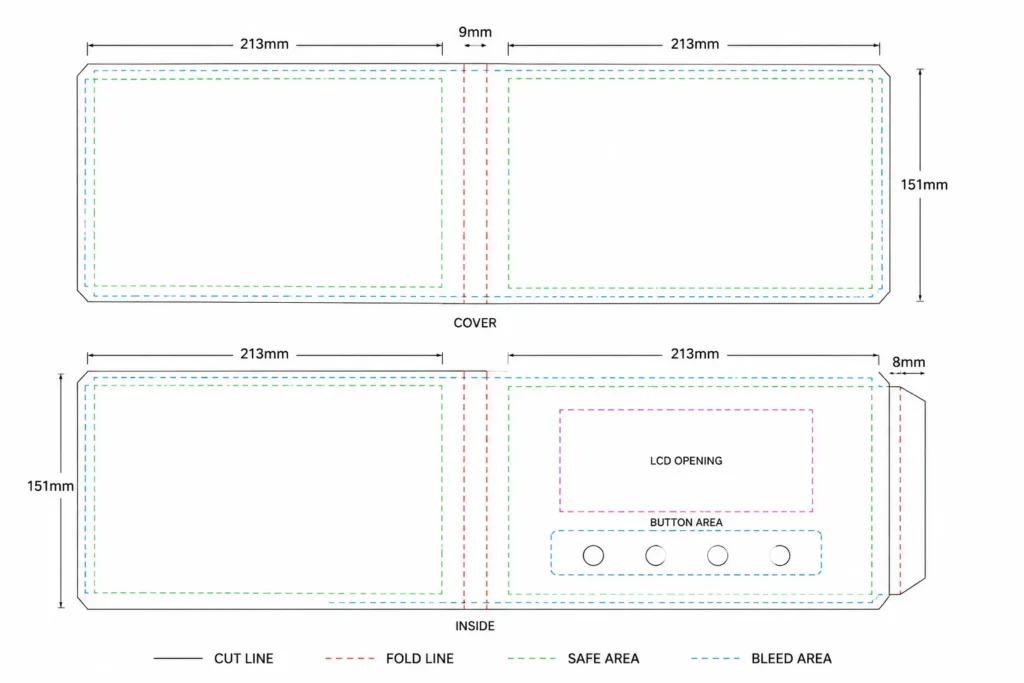
Using the correct template is one of the most important steps before creating artwork.
A production template shows the exact areas that need attention, including:
- Cutting lines
- Folding positions
- Screen opening area
- Button locations
- Speaker area
- Safe printing area
- Bleed area
CheerTrend provides templates based on different video brochure structures and screen sizes. Download our Video Brochure Template to prepare your artwork before production.
Templates are available for common configurations, including:
- 2.4 inch video brochure
- 4.3 inch video brochure
- 5 inch video brochure
- 7 inch video brochure
- 10.1 inch video brochure
Using the correct template helps prevent problems such as:
- Incorrect screen positioning
- Artwork crossing folding areas
- Buttons covering important design elements
- Misalignment between printing and hardware
Need a template for your project?
Contact us and we will provide the correct layout based on your selected video brochure model.
Video Brochure Artwork Requirements
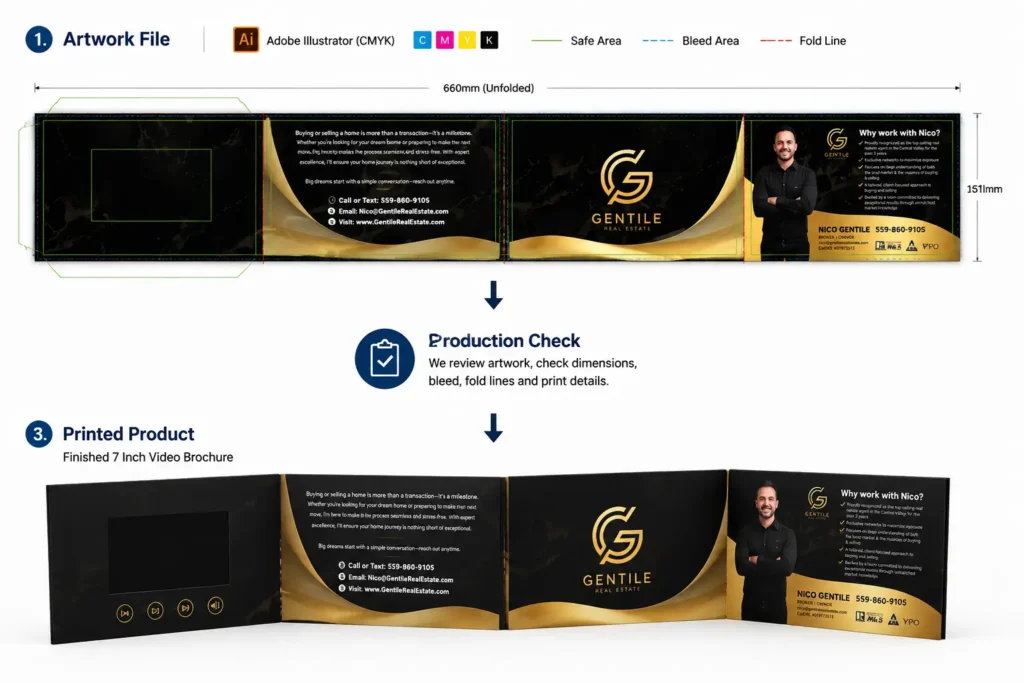
Preparing the correct video brochure file requirements is an important step before production. Your artwork should follow the required format, dimensions, and printing specifications.
| Item | Requirement |
|---|---|
| File Format | AI, PDF, CDR |
| Color Mode | CMYK |
| Resolution | 300 DPI |
| Fonts | Convert fonts to outlines |
| Images | Use high-resolution images |
| Bleed | Follow the supplied template |
Adobe Illustrator files are commonly preferred because they allow easier checking of:
- Dimensions
- Layers
- Text elements
- Printing details
Recommended Video Brochure File Formats
The recommended video brochure file formats include AI, PDF, and CDR. These files allow our production team to check dimensions, layers, and printing details before manufacturing.
Before production, customers can send artwork files for review to confirm that the design matches the selected video brochure structure.
How to Prepare a Video Brochure Design File
A typical production workflow includes the following steps:
Step 1: Confirm Product Structure
Before designing, confirm:
- Screen size
- Cover style
- Opening direction
- Button options
- Memory capacity
- Battery configuration
The product structure affects the artwork layout.
Step 2: Download the Correct Template
Use the template that matches the selected model.
The template defines:
- Finished size
- Fold positions
- Screen opening
- Hardware areas
Starting with the correct template reduces unnecessary revisions later.
Step 3: Create the Artwork
Your designer can add:
- Company logo
- Brand colors
- Product images
- Marketing messages
- Decorative elements
The printed design should work together with the video content.
For example:
- Use matching brand colors
- Keep visual style consistent
- Introduce the same logo style in both print and video
Step 4: Artwork Review Before Production
Before manufacturing, the artwork should be checked for:
- Correct dimensions
- Proper screen placement
- Button positions
- Folding areas
- Print quality
This step helps avoid production delays caused by artwork adjustments.
Video Brochure Design Considerations by Application
Different applications may require different design approaches.
Corporate Presentations
Corporate video brochures usually focus on:
- Professional branding
- Company introduction
- Product presentations
- Sales communication
A clean layout with clear messaging usually works best.
Real Estate Marketing
Real estate video brochures often focus on visual presentation.
Important design elements include:
- High-quality property images
- Large video display area
- Premium finishing
- Professional branding
The goal is to create a stronger presentation experience than a traditional printed brochure.
Agency and Marketing Projects
Marketing agencies often create custom video brochures for their clients.
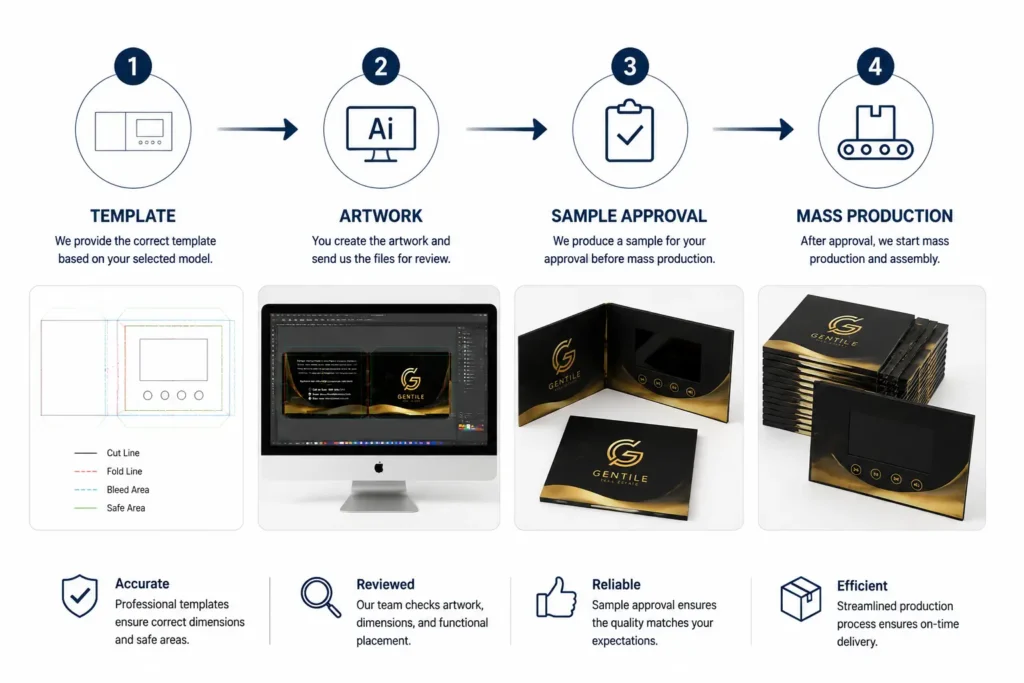
The typical process includes:
- Selecting the product structure
- Receiving production templates
- Creating artwork
- Reviewing samples
- Starting production
Customers can work with their own design team while CheerTrend supports manufacturing and production requirements.
Common Video Brochure Design Mistakes
1. Designing Without Confirming the Product Structure
One common mistake is starting artwork before confirming the final product configuration.
A video brochure contains:
- LCD module
- PCB board
- Battery
- Speaker
- Buttons
The internal structure affects the available design area.
Confirming the product first helps avoid redesign work later. Different video brochure models may use different internal layouts, so confirming the structure before artwork preparation helps avoid unnecessary revisions.
2. Ignoring Hardware Placement
A video brochure is not only a printed product.
The design needs to consider:
- Speaker opening location
- Button placement
- USB charging position
- Internal component space
For example, placing important graphics too close to a button area may affect the final appearance. Some design elements may need adjustment after considering the actual internal structure and assembly requirements.
3. Making the Screen Opening Too Tight
The LCD opening needs to match the screen structure and allow normal assembly tolerance.
Artwork should consider:
- Screen border
- Printing alignment
- Assembly requirements
A design that looks correct on screen may still require adjustment during manufacturing if the opening area is not prepared properly.
2. Ignoring Hardware Placement
A video brochure is not only a printed product.
The design needs to consider:
- Speaker opening location
- Button placement
- USB charging position
- Internal component space
For example, placing important graphics too close to a button area may affect the final appearance. Some design elements may need adjustment after considering the actual internal structure and assembly requirements.
3. Making the Screen Opening Too Tight
The LCD opening needs to match the screen structure and allow normal assembly tolerance.
Artwork should consider:
- Screen border
- Printing alignment
- Assembly requirements
A design that looks correct on screen may still require adjustment during manufacturing if the opening area is not prepared properly.
4. Using Low-Resolution Images
Low-quality images may appear acceptable during design but become blurry after printing.
Recommended:
- 300 DPI images
- High-resolution product photos
- Vector logos whenever possible
5. Separating Print Design From Video Content
The strongest video brochures create a consistent experience.
Good designs usually connect:
- Printed cover
- Interior graphics
- Video opening screen
- Brand message
The physical product and the video should feel like one complete presentation.
Can I Create My Own Video Brochure Design?
Yes.
Many customers prepare their own artwork using the provided template and submit the final files for production review.
CheerTrend supports customers with:
- Product specifications
- Production templates
- Artwork review
- Manufacturing guidance
For complex branding or creative design projects, customers can work with their own graphic designers and provide the final production files.
For a full breakdown of pricing factors related to customization and production, see: Video Brochure Cost Guide.
Frequently Asked Questions
Yes. We provide templates based on different screen sizes and product structures.
Templates help customers prepare artwork with the correct dimensions, folding areas, and screen positions.
We recommend AI, PDF, or CDR files.
AI files are preferred because they allow easier checking of artwork details before production.
Yes.

Customers can prepare their own artwork using our templates and send the files for production review.Yes.
We can review artwork files to confirm that dimensions, structure, and printing requirements match the selected product.
Before starting artwork, confirm:
- Screen size
- Brochure structure
- Button requirements
- Printing style
- Hardware layout
This helps create a design that works correctly during manufacturing.
Have more questions about video brochures? Visit our Video Brochure FAQ page for more answers.
Ready to Create Your Custom Video Brochure?
Need a template or artwork review before production?
Contact CheerTrend for video brochure specifications, production guidance, and a custom quotation.