
Custom Video Box Buying Guide: How to Choose Screen, Size & Features
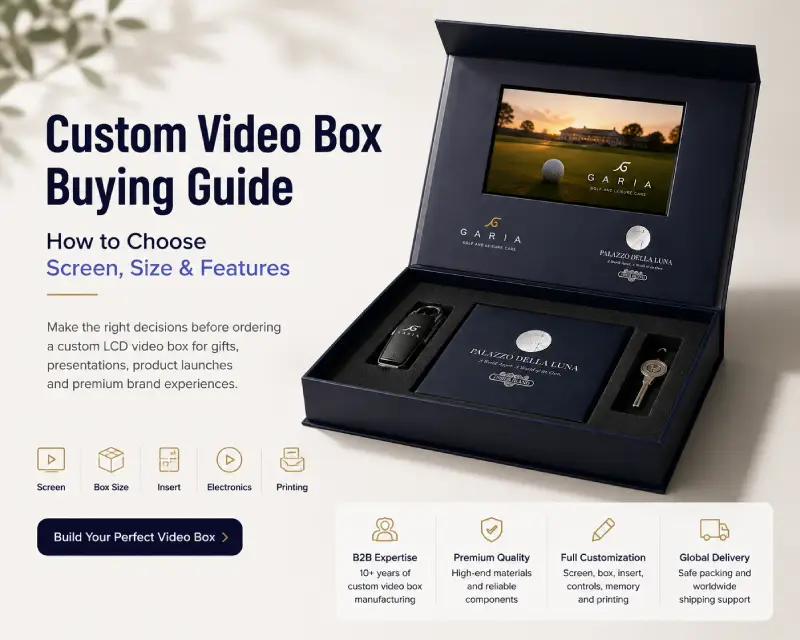
A custom video box combines a rigid presentation box with a built-in LCD screen, allowing you to present video content together with physical products, samples, gifts or sales materials.
Unlike a standard video brochure, the right video box configuration depends not only on the screen. You also need to consider the size of the items inside, available internal space, insert structure, playback controls, memory, battery, printing and shipping requirements.
This buying guide walks through the key decisions to make before ordering a custom video box for a product launch, corporate gift, sales presentation or premium marketing project.
Get a Free Quote + Artwork Template
Quick Decision Framework: 5 Decisions Before Ordering
Before requesting a quotation, work through these five decisions:
| Step | Decision | What You Need to Consider |
|---|---|---|
| 1 | Screen | Screen size, viewing area and overall presentation |
| 2 | Box Size | Product dimensions, internal space and required depth |
| 3 | Insert | Product shape, protection and accessory compartments |
| 4 | Electronics | Playback method, buttons, memory and battery |
| 5 | Printing | Artwork, surface finish and branding requirements |
You do not need to finalize every technical detail before contacting a manufacturer. In many projects, providing your product dimensions, quantity and intended use is enough to start evaluating a suitable configuration.
Is a Video Box the Right Format for Your Project?
Before choosing specifications, first decide whether you actually need a video box.
A video box is particularly useful when the presentation needs to combine digital content with a physical item.
Typical applications include:
- Product launch kits
- Premium corporate gifts
- Sales presentation kits
- Product samples
- PR and media kits
- Client onboarding packages
- Real estate presentation kits
- High-value promotional campaigns
The physical product or gift can be placed inside a custom insert while the LCD screen presents a product demonstration, brand story, sales message or instructions.
Depending on the application, custom video boxes can be configured as premium video gift boxes for corporate gifting or as video presentation boxes for product launches, sales kits and product presentations
Video Box vs Video Brochure vs Video Mailer
The three formats solve different presentation problems.
| Format | Best When |
|---|---|
| Video Box | You need to present a physical product, sample, gift or accessories together with video |
| Video Brochure | The main purpose is presenting video and printed information in a compact format |
| Video Mailer | The presentation is designed primarily for direct-mail campaigns and prospect outreach |
If the physical item is an important part of the presentation experience, a video box is usually the better starting point.
Sample orders typically ship within 2 business days.
Step 1 — Choose the Right Screen Size
Screen size affects both the viewing experience and the overall proportions of the box.
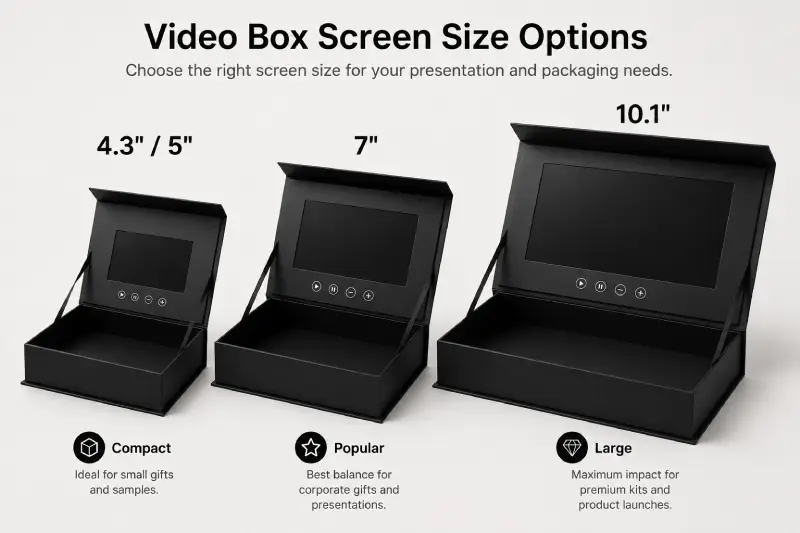
Common options for custom video boxes include:
| Screen Size | Resolution | Typical Buying Consideration |
|---|---|---|
| 4.3″ | 480 × 272 | Compact projects where box size and cost are important |
| 5″ IPS | 800 × 480 | Good balance between viewing area and overall packaging size |
| 7″ IPS | 1024 × 600 | Strong visual impact for premium gifts and presentation kits |
| 10.1″ IPS | 1024 × 600 | Large-format premium boxes and high-impact presentations |
For many B2B presentation projects, 5-inch and 7-inch screens provide a practical balance between screen visibility and packaging size.
A 10.1-inch screen creates more visual impact but requires a significantly larger lid and overall box structure.
Don’t Choose the Screen in Isolation
One common mistake is selecting the largest possible screen before considering the overall box.
The screen should remain visually balanced with:
- the box dimensions;
- the product being presented;
- the amount of printed branding around the screen;
- the required internal space.
A larger screen is not automatically a better choice.
For a compact product sample, for example, a well-proportioned 5-inch screen may create a better presentation than placing a 10.1-inch display inside an unnecessarily large box.
Step 2 — Determine Box Size and Internal Space
After choosing an approximate screen size, the next question is:
How much space does the box actually need?
Start with what needs to go inside.
Measure the main product and then list any additional contents such as:
- USB cables
- Printed cards
- Instruction booklets
- Product accessories
- Samples
- Documents
- Promotional gifts
The insert and required clearance can then be designed around those items.
Common Video Box Sizes
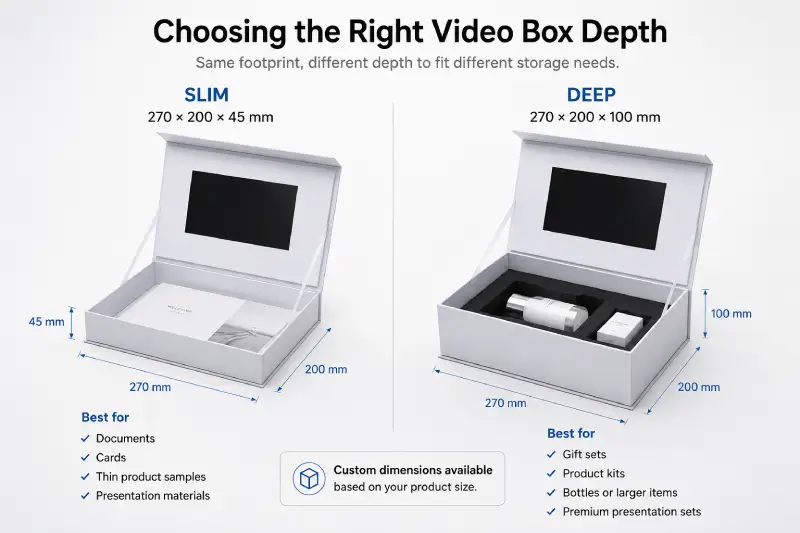
Two practical box formats we commonly work with are:
270 × 200 × 45 mm
and
270 × 200 × 100 mm
The 45 mm version provides a slimmer presentation format, while the 100 mm version offers considerably more internal depth for larger products, accessories or multi-item kits.
These are starting points rather than fixed limitations.
Custom dimensions can be produced according to the product and project requirements.
Outer Size Is Not the Same as Usable Inner Space
This distinction is important.
A box measuring 270 × 200 × 100 mm externally does not provide the full 270 × 200 × 100 mm as usable product space.
Space is also required for:
- rigid board construction;
- the LCD module;
- electronics;
- insert walls;
- foam thickness;
- product clearance.
Therefore, it is usually better to determine the product and insert requirements before finalizing the outer box dimensions.
For detailed sizing considerations, see our <a href=”/video-box-dimensions/”>Video Box Dimensions & Sizes Guide</a>.
Step 3 — Choose the Insert and Compartment Layout
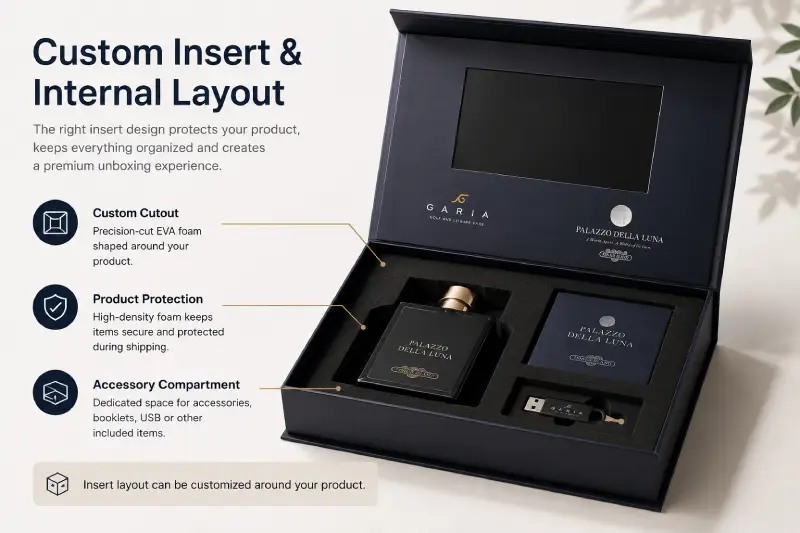
The insert determines how the product is positioned, protected and presented when the customer opens the box.
For B2B projects, this is more than a cosmetic decision.
The insert affects:
- internal dimensions;
- box depth;
- product protection;
- presentation quality;
- overall weight;
- shipping volume.
EVA Foam Inserts
EVA foam is commonly used when products need secure positioning and a premium presentation.
It can be custom cut around the shape of the product and is particularly useful for:
- electronics;
- product samples;
- bottles;
- premium gifts;
- accessories;
- fragile items.
A well-designed EVA insert prevents the product from moving during transportation while creating a clean presentation when the box is opened.
Paperboard Inserts
Paperboard structures can be useful for lighter products and projects where reducing material use, weight or cost is important.
They can also integrate naturally with the printed box design.
Multiple Compartments
A video box does not need to contain only one item.
The internal structure can be designed for combinations such as:
Main Product + USB Cable
Product + Printed Card + Accessories
Sample + Brochure + Instruction Material
Gift + Personal Message + Accessories
Before designing the insert, make a complete list of everything that must fit inside the finished box. This simple step prevents many structural problems later.
Step 4 — Choose Playback Controls, Memory and Battery
Once the physical structure is clear, decide how the recipient should interact with the video. The best configuration depends on the presentation experience you want to create.
Open-to-Play
For many gift and presentation projects, the simplest experience is:
Open the box → video starts automatically.
A magnetic activation system can trigger playback when the box is opened.
This works particularly well when there is one main brand or presentation video and you want the experience to begin immediately.
Playback Buttons
Buttons can be added when the recipient needs more control.
Typical functions include:
- Play / Pause
- Previous
- Next
- Volume +
- Volume –
- Individual video selection
For example, if the box contains several products, individual buttons can be configured to play different videos.
If the presentation contains only one short video, a large number of controls may be unnecessary.
The goal is not to add as many functions as possible. It is to make the presentation easy to understand and use.
Memory Capacity
Memory should be selected according to the total size of the video files, not according to the screen size.
Available capacities can include:
128MB / 256MB / 512MB / 1GB / 2GB / 4GB / 8GB
A short single presentation video may require relatively little storage, while several long or high-bitrate videos require more.
Before production, it is useful to provide either:
- the final video files; or
- the approximate total file size.
This allows the required memory capacity to be confirmed without unnecessarily increasing the specification.
Battery Capacity
Battery requirements depend on factors such as:
- screen size;
- total playback time required;
- speaker volume;
- playback pattern;
- project usage.
For this reason, battery capacity should be selected based on the actual project rather than simply choosing the largest available battery.
For presentation boxes that will be repeatedly demonstrated during sales meetings or events, longer operating time may be more important than for a one-time gift presentation.
Updating the Video
Video files can normally be loaded through the USB connection.
If the buyer plans to update videos after receiving the boxes, this requirement should be confirmed before production so the file-loading method and physical access can be considered in the design.
Step 5 — Choose Printing and Finishing
Once the structure and electronics are defined, the exterior can be designed around the brand and campaign.
Common customization options include:
- Full-color CMYK printing
- Matte lamination
- Gloss lamination
- Soft-touch finish
- Foil stamping
- Spot UV
- Embossing
- Debossing
The right combination depends on the positioning of the project.
Corporate Presentation
For professional sales or corporate projects, a clean printed design with matte lamination may already provide the required finish.
Premium Gifts and Product Launches
For higher-end presentation projects, options such as:
soft-touch lamination + foil stamping
or
matte lamination + spot UV
can create stronger contrast between the base surface and logo or key artwork.
Finishing should support the design rather than simply adding every available process.
Factory Insights From Real Video Box Projects
Custom video boxes vary significantly from project to project. Looking at actual production experience helps explain why configuration decisions should be made together rather than separately.
Same Screen, Different Box Depth
In one 7-inch video box project, two box structures were evaluated:
270 × 200 × 45 mm
and
270 × 200 × 100 mm
The LCD screen remained 7 inches, but the required box depth depended on what the customer wanted the packaging to hold.
This is a good example of why screen size alone cannot determine the final box dimensions.
Physical Products Can Change the Entire Structure
In another project, a customer required a 4.3-inch video screen integrated into retail product packaging.
The structure needed to support both extended video playback and the physical retail product.
After development, the project moved into a 500-piece production order.
The lesson is simple:
Design the video box around the complete presentation—not just around the LCD module.
Sample Before Larger Production
For a separate 7-inch custom video box project, physical samples were evaluated before the customer moved forward with a 605-piece production order.
CASE: CT-2018-009/010, 7″ Video Box, 605 pcs, sample-then-production. Render as plain text in Elementor — no link. Full case study not yet live on /video-presentation-boxes/. Once confirmed live, convert “605-piece custom video box project” above to a real internal link. Facts must match exactly across pages: 7″ Video Box (not Gift Box), 605 pcs.
The sample stage allowed the customer to check the physical box, screen presentation and finishing before larger-scale production.
For highly customized projects, this is one of the most useful ways to reduce production risk.
4 Common Video Box Sourcing Mistakes
Mistake 1 — Choosing the Screen Before Considering the Box
A large LCD screen can look impressive on a specification sheet but may force the entire package to become unnecessarily large.
Choose the screen together with the overall presentation format.
Mistake 2 — Treating Outer Dimensions as Internal Dimensions
Rigid board, inserts and electronic components all consume space.
Always calculate the usable internal space rather than assuming the outer dimensions represent available product space.
Mistake 3 — Finalizing the Box Before Confirming Everything Inside
A project may begin with one main product and later add:
- cables;
- cards;
- accessories;
- booklets;
- additional samples.
These additions can change the insert and even the required box depth.
Finalize the contents first whenever possible.
Mistake 4 — Ignoring Shipping Volume
A deeper box provides more space, but it also increases packed carton volume.
For international B2B orders, this can affect air freight or express shipping costs significantly.
The right box is therefore not necessarily the largest box—it is the smallest practical structure that safely presents everything required.
For a detailed explanation of price drivers, see our Video Box Cost Guide.
How Much Does a Custom Video Box Cost?
There is no single standard price for a custom video box because the specification can change substantially between projects.
Major cost factors include:
- screen size;
- order quantity;
- box dimensions;
- box depth;
- insert structure;
- memory capacity;
- buttons and playback functions;
- printing and finishing;
- shipping volume.
For example, increasing the box depth may have relatively little effect on the LCD electronics but can increase packaging material and international shipping volume.
For detailed pricing factors and quotation considerations, see our Video Box Cost Guide.
See Real Video Box Configurations
Before deciding on a configuration, it can help to review completed projects and compare:
- different screen sizes;
- box structures;
- product inserts;
- branding approaches;
- presentation applications.
Our previous projects have included video boxes for product packaging, corporate presentations, promotional gifts, real estate presentations and other custom applications.
See more configurations in our Video Box Examples.
Video Box RFQ Checklist
You do not need a finished dieline before asking for a quotation.
Providing the following information usually allows the project to be evaluated much faster:
1. Quantity
For example: 50 / 100 / 500 / 1,000 pcs
2. Preferred Screen Size
If you are unsure, describe the application and overall box size instead.
3. Product Dimensions
Provide Length × Width × Height for the main item that needs to fit inside.
4. Everything Going Inside the Box
Include products, cables, cards, brochures and accessories. Photos are helpful.
5. Playback Requirements
For example: Open-to-play, one video, multiple videos, Play/Pause, volume controls, individual video buttons.
6. Approximate Video File Size
If final videos are already available, provide the total file size.
7. Printing and Finishing
Mention any requirements such as matte finish, soft-touch, foil stamping, spot UV, embossing.
8. Delivery Destination and Required Date
Provide the destination country and postcode when possible. This helps evaluate not only production requirements but also the appropriate shipping method and timeline.
Frequently Asked Questions
There is no single best size. A 5-inch screen works well for compact presentations, while 7-inch screens provide stronger visual impact for many premium presentation boxes. A 10.1-inch screen is better suited to larger-format projects. The screen should be selected together with the overall box dimensions.
Yes. Video boxes can be produced in custom dimensions according to the product, insert, screen and presentation requirements. Common formats such as 270 × 200 × 45 mm and 270 × 200 × 100 mm can also be used as starting points.
Yes. Custom inserts can be designed to hold products, samples, cables, cards, brochures and other accessories. The dimensions of all items should be confirmed before the insert and final box size are determined.
Yes. A magnetic activation system can be used so the video begins playing when the box is opened.
Yes. Multiple videos can be stored in the memory, and buttons can be configured for video selection, Previous/Next, Play/Pause or other required functions.
Yes. Video files can normally be updated through the USB connection. If self-updating is important to your project, confirm this requirement before production.
Memory depends mainly on the total size of your video files. A short single video may only require a small capacity, while multiple or larger videos may require 512MB, 1GB or more. Providing the actual video files is the most reliable way to determine the appropriate capacity.
For a highly customized video box, a physical sample is recommended before larger production. It allows you to check the box dimensions, product fit, insert, screen playback, controls, printing and overall presentation before approving mass production.
Not sure which screen, box size or insert structure to choose?
Send us: your quantity + product dimensions + a photo of everything that needs to go inside.
CheerTrend can help evaluate the screen size, internal space, insert structure and electronic configuration before the final artwork is prepared.
Request a Custom Video Box Quote