
Video Brochure FAQ: Everything You Need to Know Before Ordering
This guide provides concise answers to the questions buyers ask most often before ordering a custom video brochure.
Whether you’re comparing suppliers, choosing a screen size, estimating memory requirements, or planning a marketing campaign, these answers will help you understand the key decisions before production begins.
For detailed comparisons, pricing breakdowns, and technical recommendations, you’ll also find links to our in-depth buying guides throughout this page.
Video Brochure at a Glance
| Feature | Details |
|---|---|
| Applications | Product launches, sales presentations, direct mail |
| Screen Sizes | 2.4″, 4.3″, 5″, 7″, 10.1″ |
| Memory | 128MB–8GB |
| Playback | Auto-play or button control |
| Updates | USB video update |
Get a Free Quote + Artwork Template
Table of Contents
Frequently Asked Topics
- Choosing the right screen size
- Estimating memory requirements
- Updating videos after delivery
- Battery life and charging
- Artwork preparation
- Production and shipping
Getting Started
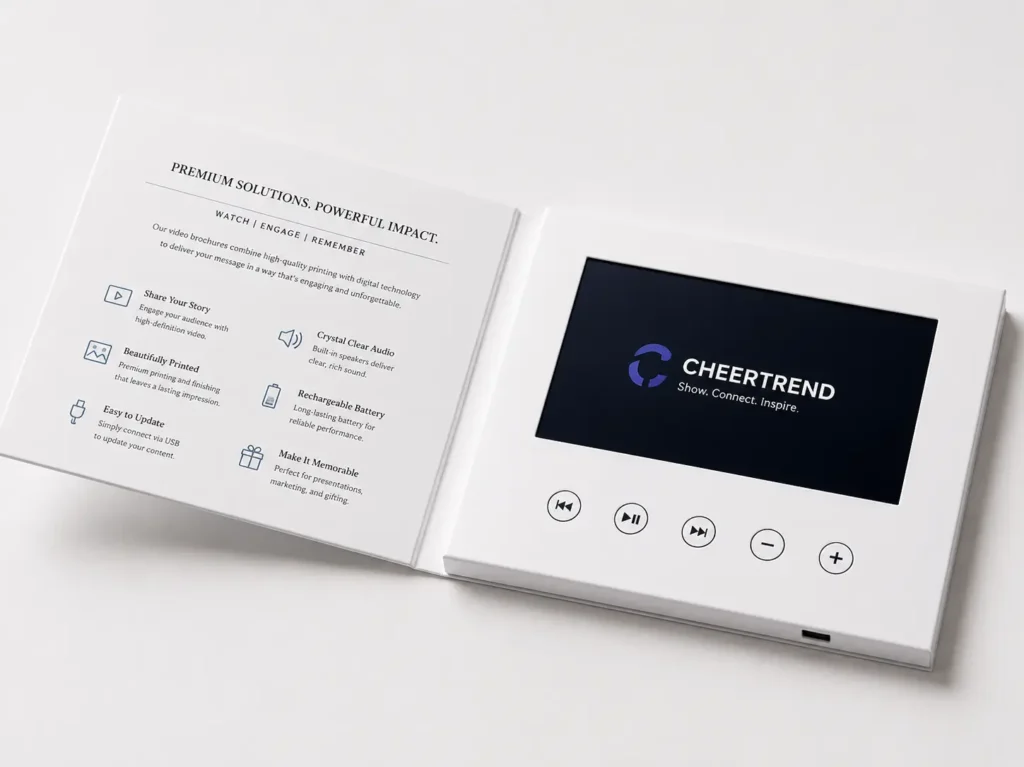
A video brochure is a printed presentation folder or booklet with a built-in LCD screen, speaker, rechargeable battery, and flash memory. Opening the cover triggers a preloaded video automatically or through control buttons. It combines print and digital media in one presentation, letting recipients start watching immediately without an internet connection or external device.
A compact electronic module inside the brochure holds the LCD screen, battery, speaker, and memory. Video is preloaded before shipment, and a magnetic switch typically starts playback when the cover opens. Optional buttons can control play, pause, volume, or video selection, and content can be recharged and updated later through USB.
A printed brochure can only describe a product; a video brochure can demonstrate it. Playback starts the moment the cover opens, with no QR code or website required. This creates a smoother viewing experience and a stronger first impression for products or messages that benefit from visual storytelling.
Common applications include product launches, sales presentations, investor meetings, training, event invitations, direct mail, and premium corporate gifts. Real estate teams use them for property showcases, manufacturers for product demonstrations, and healthcare, education, and luxury brands for more engaging client and partner communication.
Yes. Screen size, brochure dimensions, cover material, printing design, button layout, memory, battery capacity, playback style, and preloaded video content can all be customized. Available options vary by screen size and brochure structure, so it’s best to confirm specifics with your supplier before production.
All three include a built-in LCD screen but serve different purposes. A video brochure is a printed presentation folder used for sales meetings and marketing presentations. A video mailer is engineered for mailing, with protective outer packaging that withstands shipping while still opening to a premium presentation. A video box pairs an LCD screen with rigid gift-style packaging built to hold a physical product, playing video during the unboxing moment rather than presenting printed information — common for luxury launches and corporate gifts. Which format fits your project depends on whether you need printed communication, direct mail, or product packaging.
Pricing & Ordering
Pricing depends on several factors, including screen size, memory, printing specifications, quantity, and shipping method. The questions below explain how quotations are typically prepared and what information you’ll need before requesting one.
Because every project is customized, there isn’t a fixed price for a video brochure. Cost depends on screen size, printing specifications, memory capacity, quantity, and shipping destination. If you’re comparing configurations or estimating a budget, see our Video Brochure Cost Guide for a detailed cost breakdown.
Quotations typically include the LCD screen, electronics, rechargeable battery, memory, speaker, USB cable, custom printing, video preloading, and quality inspection. Shipping, duties, taxes, and optional upgrades are often quoted separately. Always confirm exactly what’s included before comparing quotes from different suppliers.
Samples are generally available for evaluation, and custom production is typically supported from small batch sizes upward. Larger projects often unlock more customization options and better per-unit pricing. If your project falls outside a standard range, it’s worth discussing requirements directly with the manufacturer.
Yes. A sample lets you evaluate screen quality, printing, materials, and construction before approving a larger run. Stock samples use standard printing and ship quickly; custom samples use your own artwork, logo, and video content to closely match the final product.
Yes. Fixed costs like printing setup and production planning are shared across the whole order, so per-unit price generally drops as quantity increases. If you’re deciding between two order sizes, requesting quotes for both makes it easier to compare overall value.
Useful details include preferred screen size, estimated quantity, brochure dimensions, destination country, memory requirements, number of videos, button requirements, printing specifications, and delivery deadline. If some details aren’t finalized, an experienced manufacturer can recommend suitable options based on your intended use and budget.
Screen Sizes & Playback
Screen size affects viewing experience, brochure dimensions, weight, and cost, so choosing one involves more than picking the largest display. The questions below cover the available sizes and how playback typically works.
Common options include 2.4″ (compact presentations and video business cards), 4.3″ (entry-level brochures and direct mail), 5″ (balanced business presentations), 7″ (product demonstrations and corporate presentations), and 10.1″ (large-format, high-impact presentations). The best fit depends on format, viewing distance, and budget rather than simply choosing the largest screen.
There’s no universal best size. Smaller screens suit compact brochures and cost-sensitive mailers; 5″ and 7″ screens balance viewing experience and portability for most sales presentations; 10.1″ screens deliver maximum visual impact for premium and executive marketing projects. See our Video Brochure Sizes Guide for a full comparison.
Yes, this is the most common configuration. A magnetic sensor detects when the cover opens and starts playback immediately, then stops it when closed to conserve battery. This hands-free operation is widely used for marketing presentations, product launches, and direct mail campaigns.
Yes, buttons are optional and customizable — common functions include play/pause, next, previous, volume, replay, and power. Some projects use automatic playback only with no visible buttons, while others include multiple controls so viewers can browse several videos independently.
Yes, provided there’s enough available memory. Viewers typically switch between videos using dedicated buttons or an on-screen menu, depending on the hardware. The actual number of videos depends on file size, resolution, and compression rather than a fixed limit.
Yes. Many companies open playback with a short branded introduction — logo, animated graphics, or a title screen — before the main presentation. Since this is part of the video content rather than the hardware, it can be customized just like the rest of your presentation.
Memory & Video Management
Memory capacity determines how much video your brochure can store, and the right choice depends on your content rather than the screen size alone. The questions below cover how memory works and how videos are managed after production.
Required memory depends more on your video content than on screen size. Short promotional videos fit comfortably in smaller capacities, while longer presentations or multiple videos need more storage. Sending your video file to the supplier is usually the easiest way to get a suitable recommendation.
Video brochures are commonly available from 128MB up to 8GB. Smaller capacities suit short promotional videos, while larger capacities suit longer presentations, multiple videos, or higher-quality files. See our Video Brochure Memory Guide for help estimating what your content needs.
There’s no fixed maximum length. Total playback time depends on available memory and the video file’s size after compression — two videos of equal length can require very different storage depending on resolution, encoding, and bitrate. An estimated length and resolution is usually enough for an initial recommendation.
Most video brochures support common formats, with MP4 recommended for its compatibility and efficient compression. Manufacturers can often convert compatible files before loading them. For best results, provide the highest-quality final video available before production begins.
Yes. Connecting the brochure to a computer via the supplied USB cable typically makes it appear as a removable drive on most computers, letting you replace video files as needed. This makes video brochures suitable for content that may need future updates. See How to Upload Videos to a Video Brochure for step-by-step instructions.
Yes. Manufacturers can preload different videos onto different groups of brochures in the same production run — useful for personalized campaigns, multilingual content, or region-specific material. Clearly organizing files and quantity breakdowns before production helps avoid loading errors.
Battery & Charging
Battery performance matters most for projects involving shipping, exhibitions, or repeated demonstrations. The questions below explain how rechargeable batteries work and what to expect before ordering.
Battery life depends mainly on screen size, display brightness, speaker volume, and playback duration. Larger screens and longer videos draw more power. The built-in battery is designed for normal presentation use rather than continuous all-day playback. See our Video Brochure Battery Guide for more detail.
Yes, nearly all modern video brochures use rechargeable lithium batteries, charged via USB using the supplied cable. Once fully charged, the brochure is ready for repeated use without replacement — practical for exhibitions, sales presentations, and long-term promotional use.
Simply connect the brochure to a computer or a suitable USB power source using the supplied cable. Depending on the hardware, a charging indicator may show progress until the battery reaches full capacity. Fully charging brochures before major events helps ensure reliable playback throughout the day.
This depends on the product design — some modules allow replacement during servicing, while others are integrated assemblies not intended for routine replacement. Because internal wiring varies between manufacturers, replacement should generally be handled by qualified technicians if needed.
Store brochures in a cool, dry environment away from heat, moisture, and direct sunlight. If they won’t be used for an extended period, recharge periodically rather than leaving them fully discharged for months. Keeping them clean also helps preserve both the electronics and the printed finish.
Design & Printing
A video brochure’s printed cover creates the first impression before the screen even plays. The questions below cover artwork requirements, printing finishes, and branding options.
Most manufacturers accept print-ready files from Illustrator, InDesign, or Photoshop. Vector artwork is preferred for logos and text to keep edges sharp at any size, and images should be high resolution. Your supplier will typically provide a template showing dimensions, bleed, fold lines, and component placement.
For more details about templates, artwork preparation, and design requirements, see our Video Brochure Design Guide.
In many cases, yes — useful for different products, sales teams, languages, distributors, or regional markets. Preparing clearly named artwork files and specifying the quantity needed for each version before production helps reduce errors and keeps videos matched to the correct design.
Yes. Your logo, brand colors, typography, and message can all be incorporated into the printed design, and many companies coordinate the video’s opening frames with the printed cover for a seamless transition from print to screen.
Video brochure covers can be customized with different printing and finishing options, including CMYK printing, soft-touch lamination, foil stamping, spot UV, and embossing. See our Video Brochure Printing Guide for more details.
Production & Shipping
Understanding the manufacturing process, lead times, and shipping options helps keep your project on schedule, especially ahead of a launch or event. The questions below cover what to expect from artwork approval through delivery.
Production schedules depend on quantity, level of customization, and current manufacturing workload. Custom samples generally complete well ahead of a full production run, and finalizing both artwork and video before production begins helps avoid delays.
The supplier normally confirms artwork approval, video content, screen size, memory, button layout, printing specifications, quantity, and shipping method with you before manufacturing begins. Carefully reviewing these details upfront helps prevent misunderstandings and costly changes later.
Changes become much harder once production is underway. Minor adjustments may still be possible early on, but changes to artwork, hardware, or preloaded video after manufacturing starts can affect schedules and add cost — so review and approve everything before giving final production sign-off.
Yes. Depending on destination and requirements, shipping options may include express courier, air freight, sea freight, or door-to-door delivery. The right method depends on your timeline, quantity, destination, and budget — your supplier can recommend a suitable option.
This depends on the shipping terms agreed at ordering. Some quotations include duties and taxes through delivered pricing; others require the customer to pay import charges on arrival. When comparing suppliers, confirm what’s included so you’re comparing total landed cost, not just product price.
Warranty policies vary, but most suppliers cover manufacturing defects under normal use. If an issue occurs, the supplier will typically review photos or video of the problem before recommending replacement parts, repair guidance, or a replacement unit. Review the supplier’s warranty policy before ordering.
Related Buying Guides
If you’d like to explore specific topics in more detail, these guides go beyond the scope of this FAQ.
→ Video Brochure Cost Guide
Learn which factors affect pricing, how quantity influences unit cost, and how to compare quotations.
→ Video Brochure Sizes Guide
Compare 2.4″, 4.3″, 5″, 7″, and 10.1″ screens to choose the right option for your project.
→ Video Brochure Memory Guide
Understand video storage requirements and choose the right memory capacity for your content.
→ Video Brochure Battery Guide
Learn how battery capacity, screen size, and playback settings affect operating time.
→ How to Upload Videos to a Video Brochure
Learn how to update video content after receiving your video brochure.
Need Help Choosing the Right Configuration?
Tell us your screen size, quantity, and project requirements. Our team will recommend a suitable setup and provide a quotation.