
Video Brochure Battery Guide: Capacity, Charging & Playback Time
Battery capacity directly affects playback time, charging frequency, and the overall user experience of a video brochure.
The right battery configuration depends on factors such as screen size, video length, brightness, speaker volume, and application requirements.
This guide explains common battery options, charging methods, and manufacturer recommendations for selecting the right battery capacity for your video brochure project.
Get a Free Quote + Battery Recommendation
Video Brochure Battery Specifications
Different screen sizes require different power requirements. Learn more about choosing the right display size in our Video Brochure Sizes Guide.
Larger LCD screens generally need higher battery capacity to maintain reliable playback performance.
CheerTrend standard battery configurations include:
| Screen Size | Standard Battery Capacity | Typical Applications |
|---|---|---|
| 2.4″ Video Business Card | 300mAh | Compact promotional cards and short presentations |
| 4.3″ Video Brochure | 500mAh | Marketing brochures, invitations, and promotional campaigns |
| 5″ Video Brochure | 500mAh | Business presentations and video mailers |
| 7″ Video Brochure | 1500mAh | Real estate presentations and corporate marketing |
| 10.1″ Video Brochure | 1500mAh | Premium presentations and luxury projects |
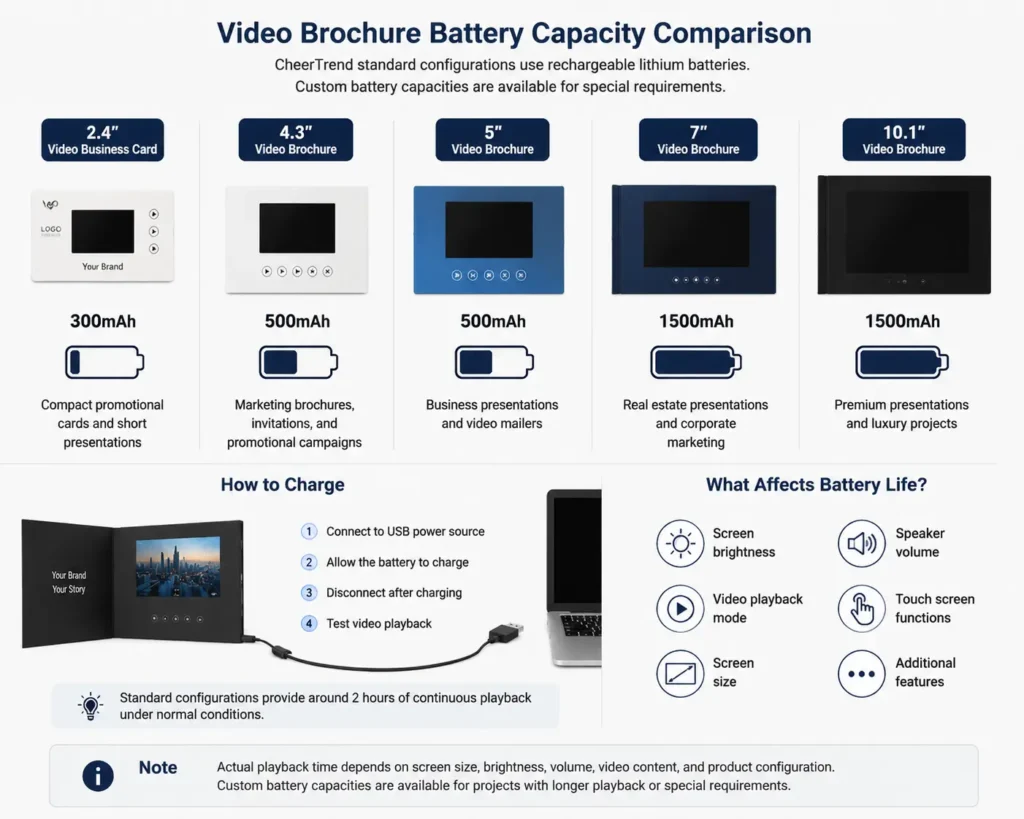
Custom battery capacities are also available for projects requiring longer playback time, larger displays, touch screens, or special usage conditions.
How Long Does a Video Brochure Battery Last?
A standard video brochure battery provides approximately 2 hours of continuous video playback under normal conditions.
However, actual battery life depends on the complete product configuration, including:
- Screen size
- Display brightness
- Speaker volume
- Video playback mode
- Touch screen functions
- Additional features
For example, a compact 4.3-inch video brochure and a 10.1-inch video brochure use different battery capacities because the larger display requires more power.
Battery performance is also related to video length, file size, and storage requirements.
Video length and file size also affect storage requirements. See our Video Brochure Memory Guide for more details.
For accurate battery recommendations, project requirements should be reviewed together with the screen size and intended usage.
Sample orders typically ship within 2 business days.
Manufacturer Insight: Why We Group Battery Capacity by Product Tier, Not Just Screen Size
Many buyers assume battery capacity should scale individually with every screen size. In practice, we group battery capacity by product tier rather than by exact screen dimension.
Our 4.3″ and 5″ video brochures share the same 500mAh battery configuration. The power draw difference between these two screen sizes is small enough that a single battery capacity comfortably supports both, without adding unnecessary cost or thickness to the smaller product.
The same logic applies to our 7″ and 10.1″ video brochures, which share a 1500mAh configuration. Both screens sit in a similar power consumption range once brightness and speaker settings are factored in, so splitting them into two separate battery specifications would add manufacturing complexity without a meaningful improvement in playback performance.
This grouping also keeps component sourcing and quality control more consistent across production runs — fewer battery SKUs means more predictable supply and more consistent testing standards.
For projects with unusual requirements — extended playback, touch functions, or high-brightness outdoor use — we adjust the battery capacity individually rather than relying on the standard tier grouping.
How Does a Video Brochure Charge?
Video brochures use rechargeable batteries that can be charged through a USB connection.
The typical charging process:
- Connect the video brochure to a USB power source
- Allow the built-in battery to charge
- Disconnect the cable after charging
- Test video playback before use
Charging requirements may vary depending on:
- Battery capacity
- Product configuration
- Charging method
CheerTrend can provide charging solutions according to different project requirements.
For more details about supported video formats, resolution, and file preparation requirements, see our Video Brochure File Requirements Guide.
Does a Larger Screen Need a Larger Battery?
Usually, yes.
Larger screens generally require more power because they have:
- Larger LCD panels
- Higher display area
- Higher power consumption
For this reason:
- 2.4-inch and 4.3-inch products usually use smaller battery configurations
- 7-inch and 10.1-inch video brochures commonly use higher-capacity batteries
However, screen size is not the only factor. The final battery selection should also consider playback frequency, brightness settings, and product functions.
Recommended Battery Configuration by Application
Different applications have different battery requirements.
| Application | Recommended Battery Configuration |
|---|---|
| Wedding Invitation | Standard rechargeable battery |
| Event Invitation | Standard rechargeable battery |
| Marketing Brochure | Standard battery configuration |
| Real Estate Presentation | Standard or higher capacity battery depending on screen size |
| Corporate Presentation | Higher capacity battery for extended demonstrations |
| Retail Display Project | Customized battery solution |
| Touch Screen Video Brochure | Higher capacity battery option |
The best battery configuration depends on how the video brochure will be used after delivery, especially for different applications such as real estate marketing, corporate presentations, and product launches.
Can Video Brochure Battery Capacity Be Customized?
Yes.
Standard battery configurations cover most video brochure projects, but custom battery solutions are available for special requirements.
Customization options may include:
- Higher battery capacity
- Longer playback requirements
- Larger screen sizes
- Touch screen functions
- Frequent-use applications
During the quotation process, CheerTrend can recommend the most suitable battery option based on your project details.
Video Brochure Battery FAQ
Yes. Most video brochures use built-in rechargeable lithium batteries that can be charged through USB connection.
Standard video brochures typically provide around 2 hours of continuous playback. Actual battery life depends on screen size, brightness, volume, and product configuration.
Battery capacity depends on the screen size. Standard configurations range from 300mAh for 2.4-inch video business cards to 1500mAh for larger 7-inch and 10.1-inch video brochures.
Video brochures can be charged through a USB cable connected to a computer or USB power adapter.
Yes. Custom battery capacities are available for projects requiring longer playback time or special functions.
Choose the Right Battery Configuration for Your Video Brochure Project
The right battery configuration helps balance playback performance, product size, and project cost.
Whether you need a compact video invitation or a premium corporate presentation video brochure, CheerTrend can recommend the suitable battery solution based on your application.
Get a Free Quote + Battery Recommendation